


AuroraMe: Northern Lights App
4.414.00 Reviews
App Specs
- Version
- 1.9.2
- Updated On
- License
- Free
- Downloads
- 10,000+
- Developer
- Adventure Walkers
- Categories
- Weather
- Platform
- Android
Screenshots
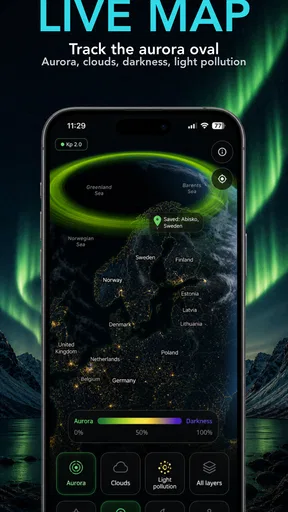
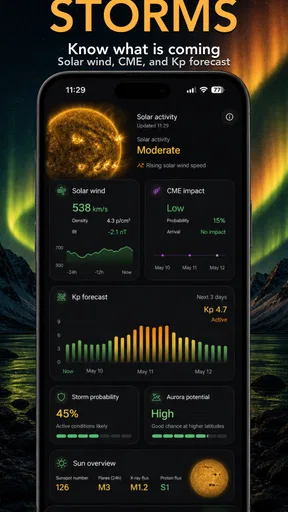
 Analysis by AppCompare
Ever wanted to chase the Northern Lights but didn’t know where to start? Well, let me introduce you to AuroraMe: Forecast & Alerts. I recently took it for a spin, and let me tell you, it’s like having a personal aurora guide right in your pocket.
A focused forecast, not an all-purpose weather desk
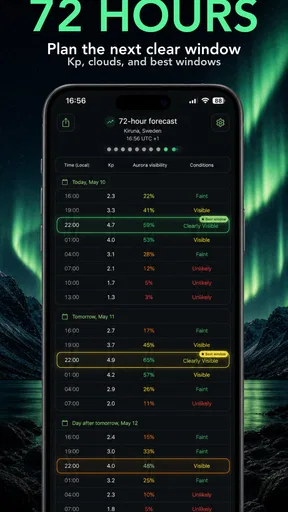
Aurora hunting involves more than checking whether the sky might glow. You also need to consider cloud cover, the KP index and the moon, and AuroraMe brings those factors together for visibility planning. That focus is its main appeal: rather than opening a general weather app and piecing together several clues, you can use one place to think through whether an outing is worth the effort.
I’d treat its forecast as a decision aid, not a promise that the lights will appear overhead. Conditions can change, and a forecast cannot make an uncertain natural event certain. The practical question is whether the combination of activity, cloud conditions and moonlight makes looking worthwhile. If the picture is mixed, I’d keep plans flexible rather than drive a long distance on the strength of one encouraging indicator.
That distinction matters for visitors as well as local sky-watchers. If I were planning a trip around an aurora, I’d use the app to help choose when to check the sky, while keeping accommodation and transport plans sensible enough to survive a disappointing forecast. A visibility tool can make a plan better informed; it cannot remove the weather risk.
Finding Your Way through the Features
So, what’s the first thing you notice when you open AuroraMe: Forecast & Alerts? It’s got this sleek, user-friendly interface that just screams, "Hey, I’m here to help you find the auroras!" I love that it isn’t cluttered with unnecessary features—just what you need to get started on your aurora journey.
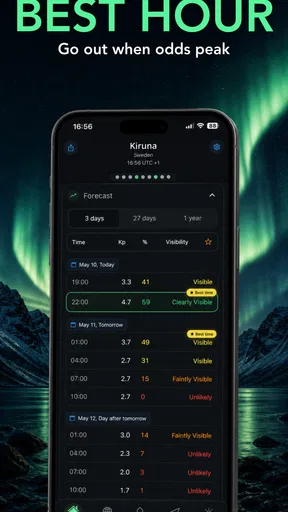
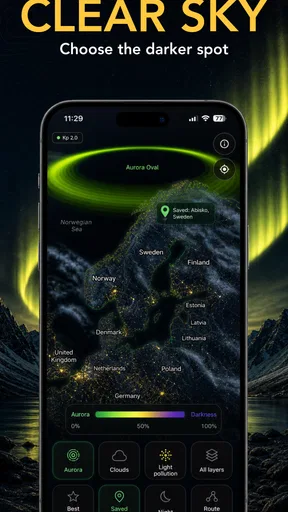
One of the standout features is the real-time aurora forecast. It gives you a heads-up on when and where the lights are likely to appear. No more guessing games! Plus, they’ve got this handy map that shows auroral activity in different parts of the world. If you’re like me and can’t resist a good visual, this is a game-changer.
Stay Alert with Notifications
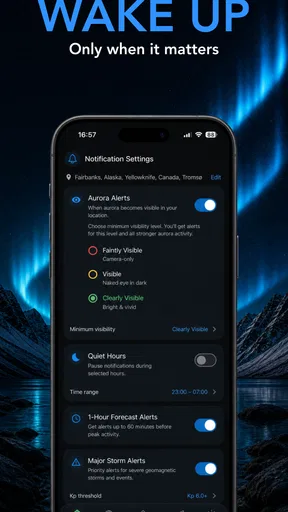
Now, let’s talk alerts. These aren’t your run-of-the-mill notifications that you swipe away. No, these are personalized alerts that you can set based on your location and the intensity of the auroras. Imagine getting a ping just as the lights are starting to dance across the sky. It’s like magic!
Worth Reading Before You Choose

Flipboard Shows What News Apps Must Do Beyond the Feed

Switching to Android Auto Means Rethinking Your Driving Routine

Google Calendar Makes a Crowded Week Easier to Manage

Ludo King Makes the Most of the Minutes Between Plans

Baby Panda World Brings Quick Play to Modern Phones, but Its Game Library Feels Busy

ESPN’s Live Game View Makes Following Close Games Easier
And if you’re worried about missing out, don’t be. The app lets you customize the alert settings, so you only get notifications that matter to you. It’s all about that personal touch.
I’d set an alert threshold with my plans in mind instead of choosing the most sensitive option automatically. A nearby observer with an open evening may welcome frequent updates, while someone who has to arrange a late drive might prefer a notification only when conditions look especially promising. This is a useful trade-off: tighter filtering can reduce interruptions, but it may also mean hearing about a less dramatic opportunity later.
For a realistic evening routine, I’d check the forecast before dinner, decide whether to prepare to go out, and then let an alert prompt a fresh look rather than treating it as an instruction to leave immediately. Before setting off, I’d check the cloud situation again and make sure the viewing spot is safe and accessible. That small pause helps keep an exciting notification from turning into a rushed trip based on just one part of the forecast.
Weather Integration for the Win
One of the things I didn’t expect to find was the weather integration. It’s not just about knowing when the auroras will appear; you also need clear skies to see them. That’s where this feature comes in handy. It offers a detailed weather forecast specific to aurora viewing, so you can plan your night perfectly.
Honestly, I find this incredibly useful, especially if you’re traveling to catch a glimpse of the Northern Lights. You can avoid those cloudy disappointments and make the most of your trip.
The useful habit here is to read the ingredients together instead of fixating on one impressive-looking figure. A strong activity signal is less compelling if cloud cover blocks the view, and moonlight can affect how dramatic a display looks. Conversely, a modest-looking forecast may still be worth watching if the sky is clear and you are already somewhere dark. The app helps frame those trade-offs, but the best choice depends on how far you need to travel and how much uncertainty you can tolerate.
Compared with a standard weather app, AuroraMe is more purpose-built for the question “Should I look for auroras tonight?” A general forecast is still useful for ordinary planning, such as deciding what to wear or whether roads may be unpleasant, but it usually leaves the aurora-specific pieces for you to interpret. I’d use both when a longer outing is involved: AuroraMe for visibility context and a regular weather source for practical local conditions.
Community Vibes and Sharing
You know what they say, sharing is caring! AuroraMe has this cool community feature where users can share their aurora sightings and experiences. It’s a great way to connect with fellow aurora enthusiasts. Plus, it gives you some serious FOMO motivation to head out and see the lights for yourself.
Not to mention, the app allows you to share your own photos and experiences, which is perfect for showing off to friends or just keeping memories of your adventures. It’s like a mini social network for aurora lovers.
I see the social side as a companion to the forecast rather than a substitute for it. Other people’s sightings can make the experience feel shared and may encourage a beginner to step outside, but a report from somewhere else does not guarantee the same view at your location. I’d use community posts for inspiration and local context, then make my own decision based on the forecast and the sky where I actually am.
Speed, stability and everyday use
For this kind of app, speed matters most at the moment you are deciding whether to go outside. AuroraMe’s focused purpose makes it straightforward to approach: I can look for the aurora outlook and relevant visibility conditions without first navigating a broad collection of unrelated tools. I would still avoid judging an entire night by a single glance. Checking again before leaving is a sensible routine whenever conditions can shift.
Heavy use is most likely to mean revisiting forecasts, adjusting alert preferences and checking the map while coordinating an outing. That is a different workload from leaving a navigation app running on a long drive or streaming video, so I would not assume AuroraMe needs to stay open all evening. A practical approach is to check it when planning, close it while waiting, and return when an alert or a change in plans makes another look useful.
I can’t infer exact battery use or how well it behaves on every phone from its feature set alone. As with other apps that provide changing forecasts and notifications, performance can also depend on the device and connection available at the time. If an update seems slow, I’d first check connectivity and reopen the forecast before concluding that the app itself is at fault. For a remote viewing location, checking the plan while you still have a dependable connection is a worthwhile precaution.
Who will get the most from it
AuroraMe makes the most sense for people who already care about seeing the Northern Lights, whether they are curious first-timers or regular sky-watchers who want the relevant conditions gathered around one goal. It is particularly handy when you have a free evening and need to decide whether to stay close to home, head somewhere darker or postpone the outing. The combination of forecast context and alerts suits someone who wants to monitor opportunities without repeatedly checking several unrelated sources.
I would skip it if you only need everyday rain and temperature forecasts, or if you have no interest in aurora viewing. A general weather app is likely to be the better everyday choice in that case. It may also be the wrong fit for someone who expects a guaranteed sighting, precise certainty far in advance or a complete travel-planning service. Aurora visibility remains uncertain, and a dedicated forecast cannot replace sensible judgement about local weather, travel and safety.
Adventure Walkers makes AuroraMe as a free weather app, with in-app purchases priced from $5.99 to $29.99 per item. It is rated for Everyone, has a 3.9 average from around 126 ratings, and has passed 10,000 installs. Those figures give a little context for its reach, but I’d put more weight on whether its aurora-focused approach matches your own plans. The current version is 1.5.5, and it requires Android 8.0 or later.
Final Thoughts
After spending some quality time with AuroraMe: Forecast & Alerts, I can honestly say it’s a must-have for anyone obsessed with catching the Northern Lights. Whether you’re a seasoned aurora chaser or a first-timer, this app has something for everyone.
From the intuitive interface to the detailed forecasts and alerts, it’s designed to make your aurora hunting as seamless as possible. And let’s not forget the community aspect that adds a whole new layer to the experience.
If you’re ready to embark on an aurora adventure, give this app a download and let it guide you to those magical lights. Trust me, you won’t regret it!
My more measured recommendation is to think of it as a focused planning companion, not a guarantee or a replacement for every weather tool. I’d reach for it when the possibility of an aurora is the reason I’m checking the sky, and pair it with ordinary local checks when travel or conditions matter. Its clearest strength is bringing several relevant visibility considerations into one decision; its natural limitation is that no forecast can promise what the sky will deliver. If that balance suits you, it gives you a practical way to decide when a look outside may be worth your time.
Pros
- User-friendly interface for easy navigation.
- Accurate and reliable weather forecasts.
- Customizable alerts for severe conditions.
- Real-time radar and satellite imagery.
- Minimal battery consumption.
Cons
- Limited offline functionality.
- Ads in the free version can be intrusive.
- Some features require in-app purchases.
- Occasional delays in alert notifications.
- Limited language support.
FAQs for AuroraMe: Northern Lights App
What is AuroraMe: Forecast & Alerts, and how does it work?
AuroraMe: Forecast & Alerts is an innovative app designed to help users track and predict aurora borealis (northern lights) activity. It uses advanced algorithms and real-time data to provide accurate forecasts. Users can receive personalized alerts for optimal viewing times and locations, ensuring they never miss a dazzling display.
Is AuroraMe available for both Android and iOS devices?
Yes, AuroraMe: Forecast & Alerts is available for download on both Android and iOS platforms. You can find the app on the Google Play Store for Android devices and the Apple App Store for iOS devices, ensuring seamless access regardless of your smartphone preference.
Does AuroraMe require an internet connection to function?
While AuroraMe does require an internet connection to access real-time data and updates, it also stores some information locally. This allows users to check past forecasts and alerts even when offline, though the most accurate and current predictions will need an active connection.
Are there any in-app purchases or subscription fees?
AuroraMe offers a free version with basic features, but for enhanced functionality, users can opt for in-app purchases or a subscription. The premium version includes advanced forecasting tools, ad-free experience, and customizable alerts, providing an enriched user experience for aurora enthusiasts.
How accurate are the forecasts provided by AuroraMe?
AuroraMe utilizes state-of-the-art technology and data from reputable sources to ensure highly accurate aurora forecasts. While no prediction can be 100% guaranteed due to the complex nature of auroral activity, the app consistently provides reliable alerts and timing to maximize your chances of a successful viewing.


